Why I didn't build my home screen on e-ink
I wanted a calm home screen that doesn't glow. E-ink was the obvious pick, and I chose a reflective LCD instead. Here's the honest trade-off.
Short answer: I wanted a screen for my home that doesn't glow but still feels alive: a clock that ticks, a list that changes the moment I press a button. E-ink is wonderful for pages that stay still and less wonderful for a screen that changes all day. So Tiny Tomte uses a reflective LCD. Like e-ink, it has no backlight and is lit by the light in your room. Unlike e-ink, it changes the picture without a flash. The catch: it needs some light to be seen, and it uses more power than e-ink. Below is the longer version, with the trade-offs on both sides.
What I wanted from a screen at home
The list was short:
- Glanceable. The time, the weather, today's list. One look from across the kitchen, and I'm done.
- No glow. Nothing lit up in the bedroom at night, no bright rectangle in the corner of my eye.
- Nothing to scroll. No notifications, no feed, no apps fighting for my attention. If I pick up my phone "just to check the weather", I usually find something else to do on it.
- Buttons that answer. Press a button and the screen changes now, not in a moment.
The first three point straight at e-ink, and that's where I started.
Why e-ink looks perfect at first
E-ink is the screen in e-readers. It looks like printed paper, it reads well in daylight, and it has no backlight. Best of all, it holds a picture with no power at all: once the image is drawn, the screen can sit there for days and use nothing. That's why e-readers last for weeks on a charge, and why so many people build e-ink dashboards for their homes. If your screen changes a few times an hour and runs on a battery, e-ink is a very good choice.
My screen was supposed to change more often than that. That's where e-ink started to get in the way.
Where e-ink gets in the way on a home screen
The flash
To draw a new picture cleanly, most e-ink panels do a full refresh: the screen flashes black and white, sometimes more than once, to wipe away the old image. On an e-reader you turn a page every minute or two and barely notice. On a screen in your kitchen that updates while you walk past, the flash is the one thing you do notice. It's the opposite of calm.
Ghosting
E-ink can skip the flash with a faster partial refresh. The catch is ghosting: faint traces of the previous picture stay on the screen. Panels clean them up with a full refresh from time to time, and that brings the flash back. "E-ink ghosting" is one of the most searched questions about these screens, so it's not just me.
Slow by design
E-ink works by moving tiny charged particles up and down inside the screen. That takes a visible moment. A seconds counter that ticks, a smooth change between screens, a list item that crosses out the instant you press a button: e-ink can do some of this in limited ways, and it always feels a step behind your finger.
What a reflective LCD does differently
A normal LCD, like the one in your laptop, has a backlight behind it. A reflective LCD has no backlight. Behind the liquid crystal there's a mirror-like layer instead. Light from your room passes through the screen, bounces off that layer and comes back to your eyes. The brighter the room, the clearer the picture. In direct sunlight it gets crisper, the opposite of a phone.
Liquid crystal switches quickly, so the picture changes without a flash. The screen can animate, tick the seconds and answer a button right away. I wrote more about how it works in A screen without a backlight: how a reflective LCD works.
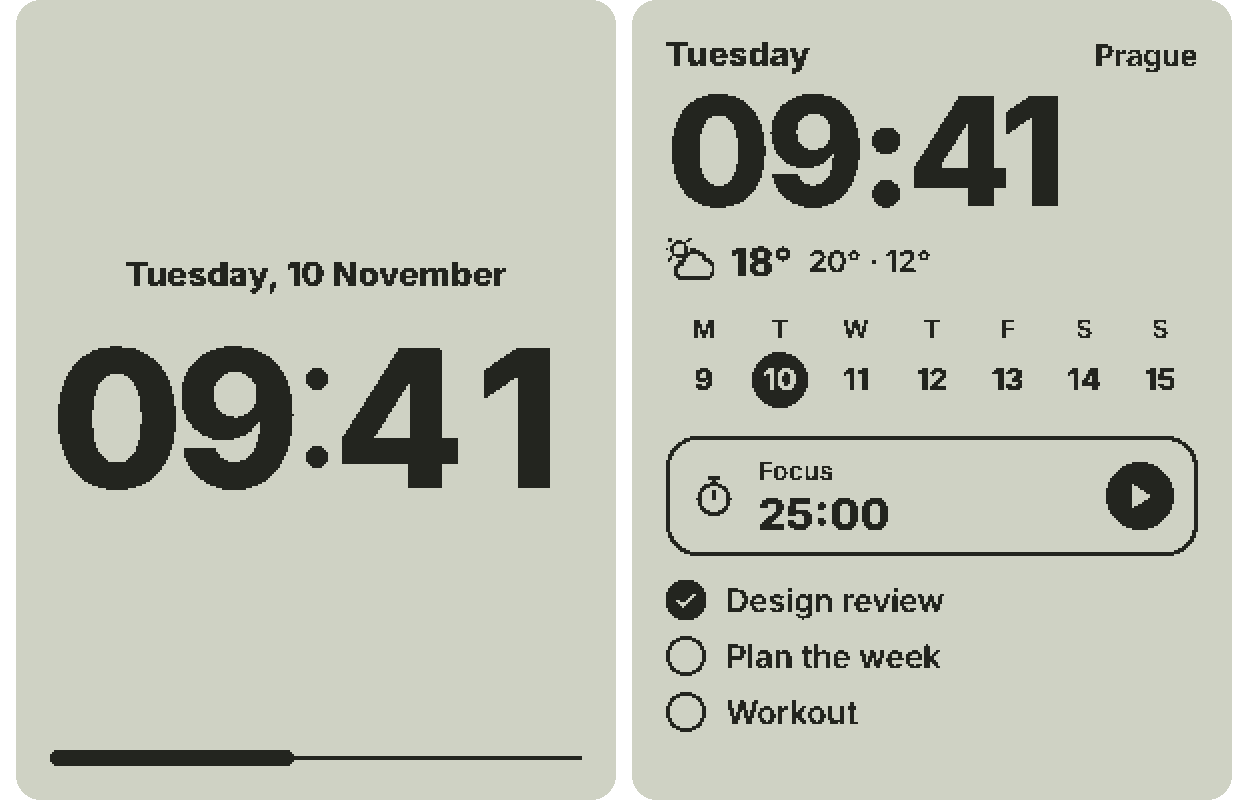
The screen in Tiny Tomte is 4.2 inches, 300 × 400 pixels, black and white only. Every pixel is either ink or paper. Greys come from fine patterns of black pixels, an old printing trick called dithering. It keeps the picture calm and sharp.
The honest trade-offs
- Backlight. E-ink: none. Reflective LCD: none.
- In daylight. E-ink reads like paper. A reflective LCD reads like print, and sunlight makes it clearer.
- In the dark. Neither is visible without a lamp.
- Changing the picture. E-ink flashes on a full refresh, and a partial refresh can leave ghosting. A reflective LCD changes without a flash.
- Animation and instant buttons. Limited on e-ink. Yes on a reflective LCD.
- Power. E-ink holds a still picture with no power, which is great on a battery. A reflective LCD needs a little power all the time to keep its picture alive.
- Colour. Some colour e-ink panels exist. Tiny Tomte is black and white only.
Two of these are real compromises, and I'd rather say them plainly.
It needs light. In a dark room you won't see Tiny Tomte, the same as a printed page. I consider that a feature in the bedroom, but if you want to read it at 3 a.m. without switching on a lamp, this isn't your screen.
E-ink wins on battery. A reflective LCD needs a little power all the time, and more when it's animating. I haven't measured battery life on my device yet, so I won't promise a number. Tiny Tomte runs from a USB-C cable, on a stand on your desk or shelf, like a clock.
So which one should you pick?
- Pick e-ink if your picture changes a few times a day, you want it to run for weeks on a battery, and a flash now and then doesn't bother you.
- Pick a reflective LCD if you want a small screen that feels alive: a ticking clock, a list you tick off with a button, weather that updates without a flash. And if you're happy that it rests in the dark along with the rest of the room.
If you're weighing other kinds of home screens too, I've put them side by side in Home dashboards: an honest map of the options.
What this means for a calm home
I chose the reflective LCD for the same reason I left out notifications: a calm screen shouldn't ask for your attention. When something changes, it just changes. No flash, no glow, no feed. Three buttons on the front, so you don't need your phone to use it. And no AI inside: the base device runs plain widgets. AI is only an optional Pro feature, with your own AI key.
That's also why it's called Tiny Tomte. In Scandinavian folklore a tomte is a quiet house spirit who helps around the home and asks for very little in return. More about him in What is a tomte?
You can press the buttons of a life-size Tiny Tomte in your browser: start with the clock, then flip to the weather. It shows only what the real screen can do. If you'd like one on your desk, join the waitlist and I'll write when it's ready.
FAQ
Is a reflective LCD the same as e-ink?
No. Both have no backlight and use the light in your room. E-ink moves charged particles and holds a picture without power. A reflective LCD uses liquid crystal over a mirror-like layer and changes the picture without a flash.
Why does e-ink flash?
To clear the old picture completely, most e-ink panels drive every pixel to black and white before drawing the new image. That's the flash of a full refresh. A partial refresh skips it but can leave faint ghosts.
Can you see a reflective LCD in the dark?
No. Like paper, it needs some light. That's the trade-off for a screen that never glows.
Does a reflective LCD use more power than e-ink?
Yes. E-ink can hold a still picture with no power. A reflective LCD needs a little power all the time, and more when it animates.
Is Tiny Tomte e-ink?
No. It's a reflective LCD: a live screen that's lit by your room.