A screen without a backlight: how a reflective LCD works
A reflective LCD has no backlight. It uses the light in your room, gets clearer in sunlight and stays dark at night. Here's how it works, in plain words.
Short answer: A reflective LCD is a liquid-crystal screen with a mirror-like layer behind it instead of a backlight. Light from your room comes in through the front, passes the liquid crystal, bounces off that layer and goes back out to your eyes. Each pixel either lets that light return, so it looks like paper, or blocks it, so it looks like ink. The screen makes no light of its own. That's why it never glows, why sunlight makes it clearer and why you can't see it in the dark. It's the screen I chose for Tiny Tomte, and this is how it works.
Three kinds of LCD
Almost every LCD works the same way in the middle: a thin layer of liquid crystal that acts like a shutter for light. The difference is where the light comes from.
Transmissive: the one in your laptop
A backlight sits behind the screen and shines through the liquid crystal towards you. It's bright, it can show colour and it works in a dark room. The downsides are the ones we all know: it glows, and in direct sunlight it washes out, because the sun is far brighter than any backlight.
Reflective: lit by the room
There's no backlight at all. Behind the liquid crystal there's a reflector, a layer that works like a mirror. The screen borrows the light that's already in the room and sends it back. It reads like a printed page: more light, clearer picture.
Transflective: a bit of both
A transflective screen reflects room light and also has a backlight for the dark. You'll find these in outdoor gadgets and some sunlight-readable monitors. It's a sensible compromise, but in the dark it's back to a lit screen that glows.
How a pixel turns dark or light
Light waves wiggle in a direction. A polarising filter at the front of the screen only lets through light that wiggles one way. The liquid crystal sits in a very thin layer behind it and can turn that direction, or stop turning it when a small voltage is applied.
So for each pixel, the light that goes in and comes back from the reflector either fits through the front filter again, and the pixel looks light, or it doesn't, and the pixel looks dark. Each pixel has its own tiny electrode, so the screen controls every pixel separately.
The liquid crystal doesn't make light or colour. It only opens and closes the way out. And because it just turns, it changes quickly. Nothing has to be wiped clean first, so there's no flash between pictures. That's the big difference from e-ink, which I wrote about in Why I didn't build my home screen on e-ink.
Why sunlight makes it clearer
A screen with a backlight competes with the sun, and the sun wins. A reflective screen doesn't compete: more light in means more light back out, and the black pixels stay black. It behaves like a sheet of paper. Put it by a sunny window and it's crisper than in a dim corner.
Why you can't see it in the dark
It has no light of its own. Some gadgets with reflective screens add a small front light that shines across the screen. Tiny Tomte doesn't have one. In a dark room it's dark, like a book on the bedside table. Turn on a lamp and it's easy to read again. For a bedroom, that's exactly what I wanted.
Why black and white
Colour reflective LCDs exist. To make colour, each pixel gets coloured filters, and those filters swallow a lot of the light. On a screen that has only room light to work with, colours come out muted and the picture gets darker. A black-and-white screen keeps all of that light for contrast.
In Tiny Tomte every pixel is either ink or paper. The screen is 4.2 inches, 300 × 400 pixels.
Where the greys come from
Greys are patterns. A light grey is mostly paper with a few black dots, a darker grey has more dots. It's the same trick newspapers have used for a century, called dithering. Tiny Tomte uses five tones: ink, three patterns and paper. Thin lines and small text are always pure black, because a pattern needs a bit of room to read as grey.

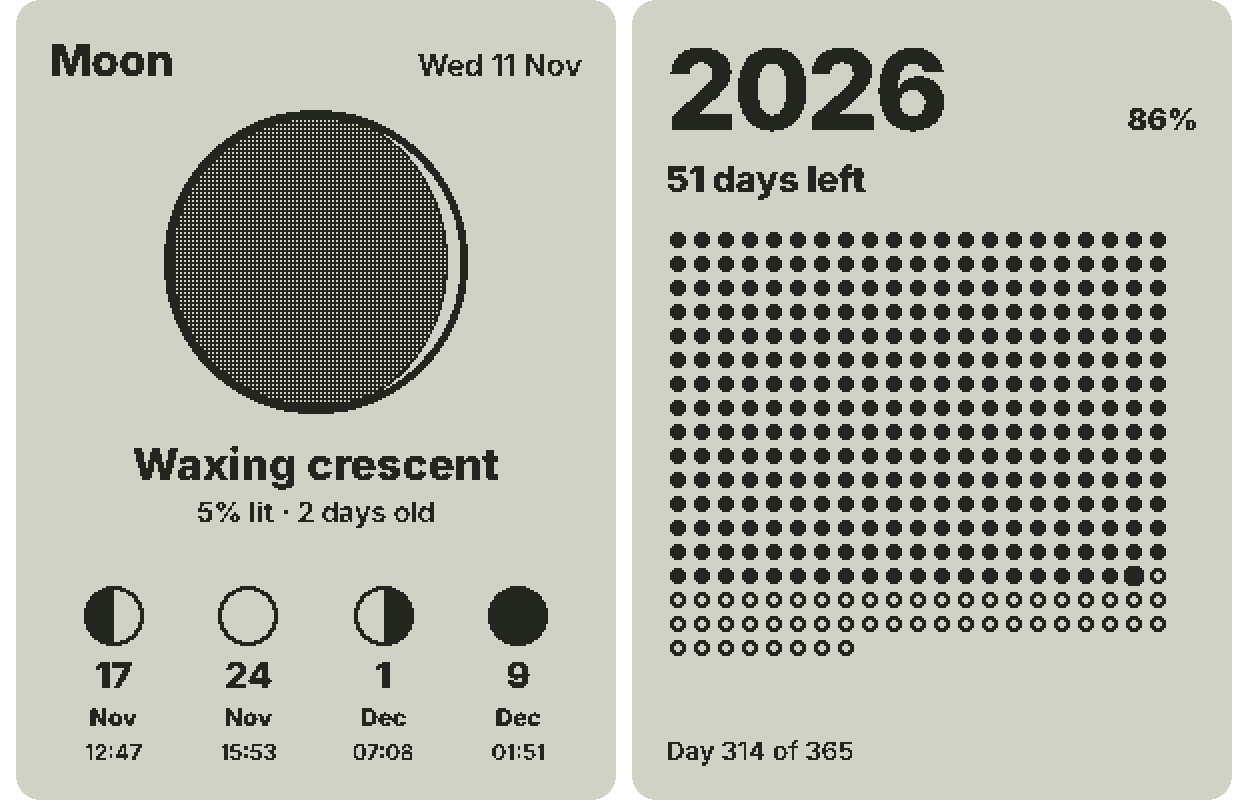
You can see the patterns at work on the Moon widget: the dark side of the Moon is a fine pattern of black dots, and the year-progress screen is made of plain ink dots.
What about memory LCDs?
When you search for reflective screens you'll see the name memory LCD. It's a family of reflective LCDs where each pixel has a tiny bit of memory next to it. The screen holds its picture by itself, so it needs very little power and only the lines that change are sent to it. They're popular in watches and small battery gadgets. Not every reflective LCD is built this way. I'll write about Tiny Tomte's power use once I've measured it on the real device, not before.
Where you've already seen one
You've probably owned a reflective LCD without thinking about it:
- a pocket calculator with grey digits;
- a digital wristwatch;
- a bike computer or a sports watch;
- the small display on a thermostat or a kitchen scale.
Most of these are simple segment displays: a few fixed shapes that switch on and off. Tiny Tomte's screen is a full grid of pixels, so it can show any picture: a clock face, the weather for the next hours, a list. I put the other kinds of home screens side by side in Home dashboards: an honest map of the options.
What this means at home
- In the kitchen in daylight, it reads like a printed note on the fridge.
- In the bedroom at night, it's dark. No glow, nothing in the corner of your eye.
- By a sunny window, it gets clearer, not worse.
- When something changes, it changes at once: the seconds tick, and a list item crosses out when you press the Mark button.
- The trade-off: it needs a little power all the time, so it runs from a USB-C cable rather than for weeks on a battery.
You can see the same two-colour picture in your browser: tick off a shopping list in the simulator, shown at about its real size. If you'd like one on your desk, join the waitlist.
FAQ
Does a reflective LCD have a backlight?
No. It has a reflector instead and uses the light in your room. A transflective LCD has both a reflector and a backlight.
Does e-ink have a backlight?
No. E-ink has no backlight either. Some e-readers add a front light that shines across the screen so you can read in the dark.
Is a reflective LCD the same as e-ink?
No. Both use room light, but e-ink moves charged particles and holds a picture without power, while a reflective LCD uses liquid crystal and changes the picture without a flash.
Is a reflective LCD the same as OLED?
No. OLED pixels make their own light, so an OLED screen glows. A reflective LCD makes no light at all.
Can you see a reflective LCD in the dark?
Not without a lamp. That's the trade-off for a screen that never glows.