Check your phone less at home: what to put on a screen instead
Most times I picked up my phone at home, I wanted one small thing: the time, the weather, the list. What helped me check it less, with and without gadgets.
Short answer: Most of the times we pick up a phone at home, we want one small fact: the time, the weather, what's on the shopping list, how long the pasta has left. The fact takes a second. The phone takes twenty minutes, because everything else lives there too. If those few facts are visible without a phone, there are fewer reasons to pick it up. Start with the free tricks below. A small screen without a feed, like the one I'm building, helps with the rest. It won't fix scrolling out of boredom, and I'll say so honestly.
Why "just checking" turns into twenty minutes
A phone is the best tool ever made for small questions, and that's the problem. To see the weather, you unlock it. The moment it's unlocked, there's a message, a badge, a headline. None of that is a lack of willpower. Phones are designed to be hard to put down, and they're very good at it.
So instead of fighting the phone, I started counting why I picked it up at home. It wasn't for anything important. Mostly it was for the same handful of small things.
The five small reasons I picked up my phone
- What time is it? Especially in the bedroom and the kitchen.
- Do I need a jacket? The weather, just before leaving. I wrote about this one in A weather display for home that doesn't glow.
- What do we need from the shop? The shared list.
- How long is left? The oven, the tea, the laundry.
- Did I do it today? Water the plants, take the vitamins, stretch.
Every one of these is a glance, not a task. And every one has an answer that doesn't need a phone.
Free things that work first
Before you spend anything, try these. They cost nothing, and if they're enough, you don't need my device or anyone else's.
- Charge the phone outside the bedroom. Put an ordinary clock by the bed.
- Turn off every notification that isn't a person. Your phone's own screen-time settings can also limit apps.
- Paper list on the fridge. Whoever finishes the milk writes it down.
- A wall clock and a kitchen timer. Both do one thing, and do it without a feed.
- Phone in a drawer while cooking or eating. Out of sight really is out of mind.
Paper and clocks have one limit: they don't change by themselves. The weather moves, the list lives on two phones, the habit you track on paper needs a pen and a calendar. That's the gap a small screen can fill.
Where a small screen helps
A screen at home helps only if it can't turn into another phone. For me that meant four rules:
- Nothing to scroll. It shows the answer and stops.
- No notifications. Nothing on it asks for your attention.
- No glow. It sits quietly in the room, day and night.
- Buttons, not apps. You don't need the phone to use it.
That's what I built Tiny Tomte around. It shows the time, the weather for the next hours, a countdown, today's habits. The shopping list sits on the screen, and you tick an item off with the Mark button as you put it in the bag. The screen has no backlight, so it's lit by your room and goes dark with it. If you're curious why I didn't use e-ink for this, I wrote about it in Why I didn't build my home screen on e-ink.
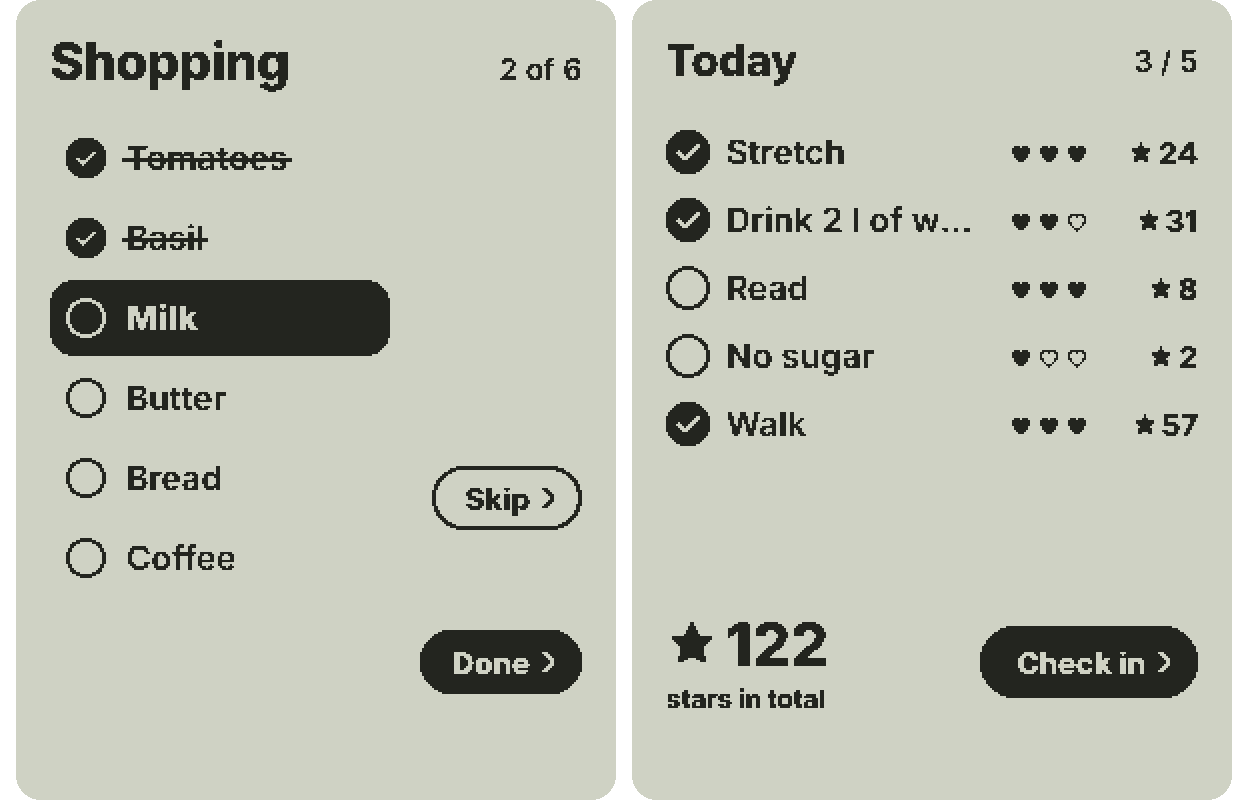
You can try the shopping list in your browser: tick items off in the simulator with the Mark button. Or check in a habit and watch what happens.
That little character is Tomte, and this is the only time he shows up while you're busy: for a second, when something is done. The rest of the time the screen just shows you the facts. You can read where his name comes from in What is a tomte?
The recipe trap
You know this one. You open a recipe on your phone, put it on the counter, and with flour on your hands you unlock it to see the next step. A message arrives. Twenty minutes later the onions are burnt.
The free fix is old-fashioned: print the recipe, or write the steps on a card. With Pro and your own AI key, Tiny Tomte can show a recipe on its screen: you hold a button, ask for one, and the answer appears while the phone stays in another room. Pro is optional. Nothing in the base device uses AI.
What a screen won't fix
I want to be straight about this. If you pick up your phone because you're bored, tired or avoiding something, a clock on the shelf won't change that. It removes reasons, not habits. Some days I still scroll for no good reason.
What it does change is the number of times you pick up the phone for a small fact and end up somewhere else. That number is easy to cut, and it adds up.
If you've switched to a simpler phone
People who move to a simple phone or a dumbphone often ask the same question: what do I use at home for the list, the timer and the weather? Paper and a kitchen timer cover a lot. A small screen covers the rest: it updates the weather by itself, and with the free setup from a browser there's no app to install on any phone.
A quick plan for this week
- Count, for one evening, why you pick up your phone at home.
- Move the top two reasons off the phone: a clock, a list on the fridge, a timer.
- Charge the phone outside the bedroom.
- Only then think about a gadget, and choose one without a feed.
If you'd like me to write when Tiny Tomte is ready, join the waitlist.
FAQ
How do I stop checking my phone so often at home?
Find the small reasons you pick it up, like the time, the weather or the list, and put those answers where you can see them without the phone. Then turn off notifications that aren't from people and charge the phone outside the bedroom.
How do I stop doomscrolling?
Make the first step harder and the reasons fewer: no phone in the bedroom, no notifications except people, and the small facts you need visible elsewhere. Doomscrolling usually starts with a quick check that never ends.
What gadgets help reduce screen time?
Simple ones that do a single job: a clock, a kitchen timer, a paper list, and a small screen without a feed or notifications. Avoid anything that becomes a second phone.
Does a screen without notifications really help?
It helps with "just checking". It won't help with boredom scrolling. It takes away reasons to pick up the phone, and that's often enough to make a difference.